 LumiMax
 MenuPiP
 Looks Important
 RamSpin


Codex Vitals
Monitor Codex and Claude usage together, then switch each provider independently. Codex works on macOS and Windows; Claude support is native on macOS.
macOS 1.6.4 · Windows 1.0.0. Free and open source.
The direct Windows installer is not code-signed yet, so Microsoft Defender SmartScreen may show a warning.
Usage at a glance
See which Codex or Claude account still has capacity.
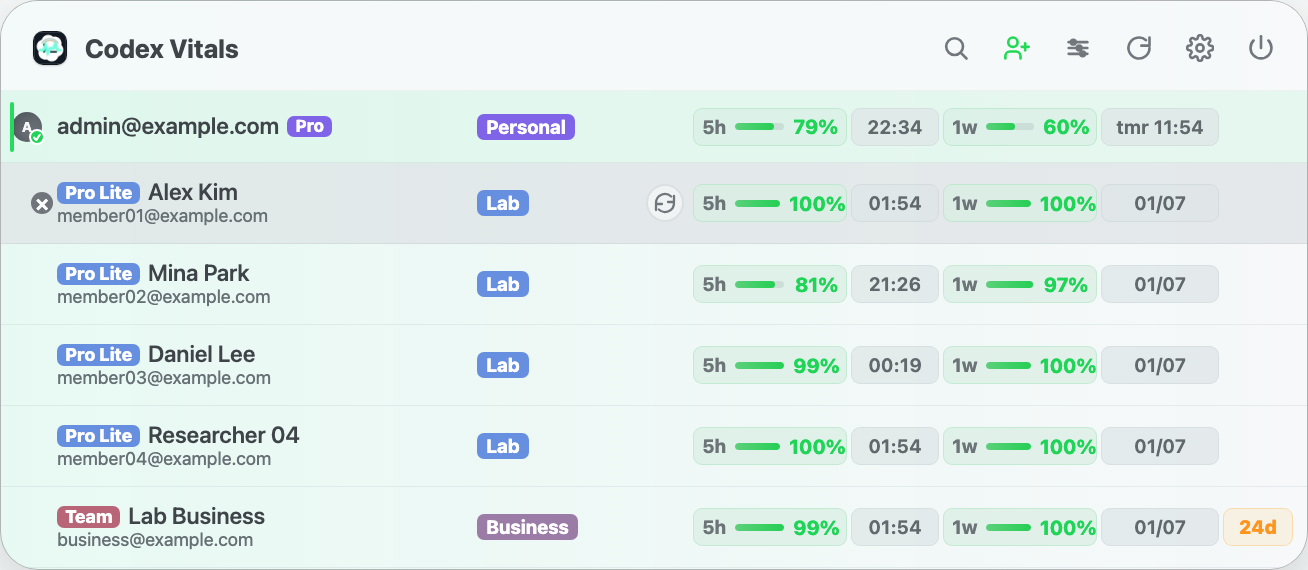
Codex Vitals keeps both providers compact: 5h and 1w usage windows, provider groups, workspace labels, aliases, plan labels, and active-account state in one app surface. On macOS, Claude accounts can also be reordered, grouped into renamed workspaces, labeled by detected plan, and given an optional local renewal date. It also shows Fable 5 weekly remaining usage and its reset time when Anthropic provides that scoped limit. Optional reset notifications are grouped after an automatic refresh confirms that capacity has recovered, using the existing refresh cycle without extra polling.
Check. Switch. Continue.
Move to an account with capacity and keep the same conversation.
See the remaining usage for every saved account, choose one with capacity, and press its switch button. Codex Vitals changes the active account for Codex CLI and for ChatGPT on macOS or Codex Desktop on Windows.
/resume or codex resume; new requests use the switched account's limits and permissions.Built for shared visibility
Made for people who manage more than one Codex account.
The app is useful when a lab, team, or solo workflow has several personal Codex accounts and needs quick visibility without constantly opening account pages.
Who is it for?
- Labs that need to check usage for several personal Codex accounts.
- Teams that want quick desktop visibility before starting long sessions.
- Developers who prefer a small utility over another browser tab.
What it is not
Codex Vitals is not an official OpenAI or Anthropic product and does not sell or proxy access to either service. It is a local tool that monitors and manually switches between accounts you add yourself.
For transparency, the source and release history are available on GitHub.
Open source
Install it, inspect it, or fork it.
The signed macOS installer and direct Windows installer are distributed through GitHub Releases, with the source available in the same repository.
System Requirements
Codex Vitals is available for Codex users on macOS and Windows.
- macOS 14.0 or later
- Windows 10/11, 64-bit
- Codex accounts you control
- Optional Claude Code installation for Claude accounts on macOS
- Network access for usage refresh
- Optional launch at login
Privacy Policy
Last updated: August 20, 2026
Codex Vitals stores account tokens and usage snapshots locally on your device.
Local data
Account profile files are stored in your macOS Library folder or Windows user profile. Saved Claude credentials use the macOS Keychain. The app does not operate a RamterStudio server for account data.
Network access
The app connects to OpenAI/ChatGPT endpoints for Codex authentication and usage, and to Anthropic OAuth endpoints for Claude usage and inactive-token refresh on macOS.
Analytics
Codex Vitals does not include analytics, advertising, tracking, or third-party profiling services.
Contact
For questions about this privacy policy, contact us at ramterstudio@gmail.com.